How to Optimize Shopify Product Pages for ChatGPT (2026 Playbook)
We audited 12 Shopify product pages across ChatGPT, Gemini, Google AI Mode, and Claude. Here is the 8-step Shopify SEO optimization playbook that raised average AI Coverage from 1/4 to 3/4.

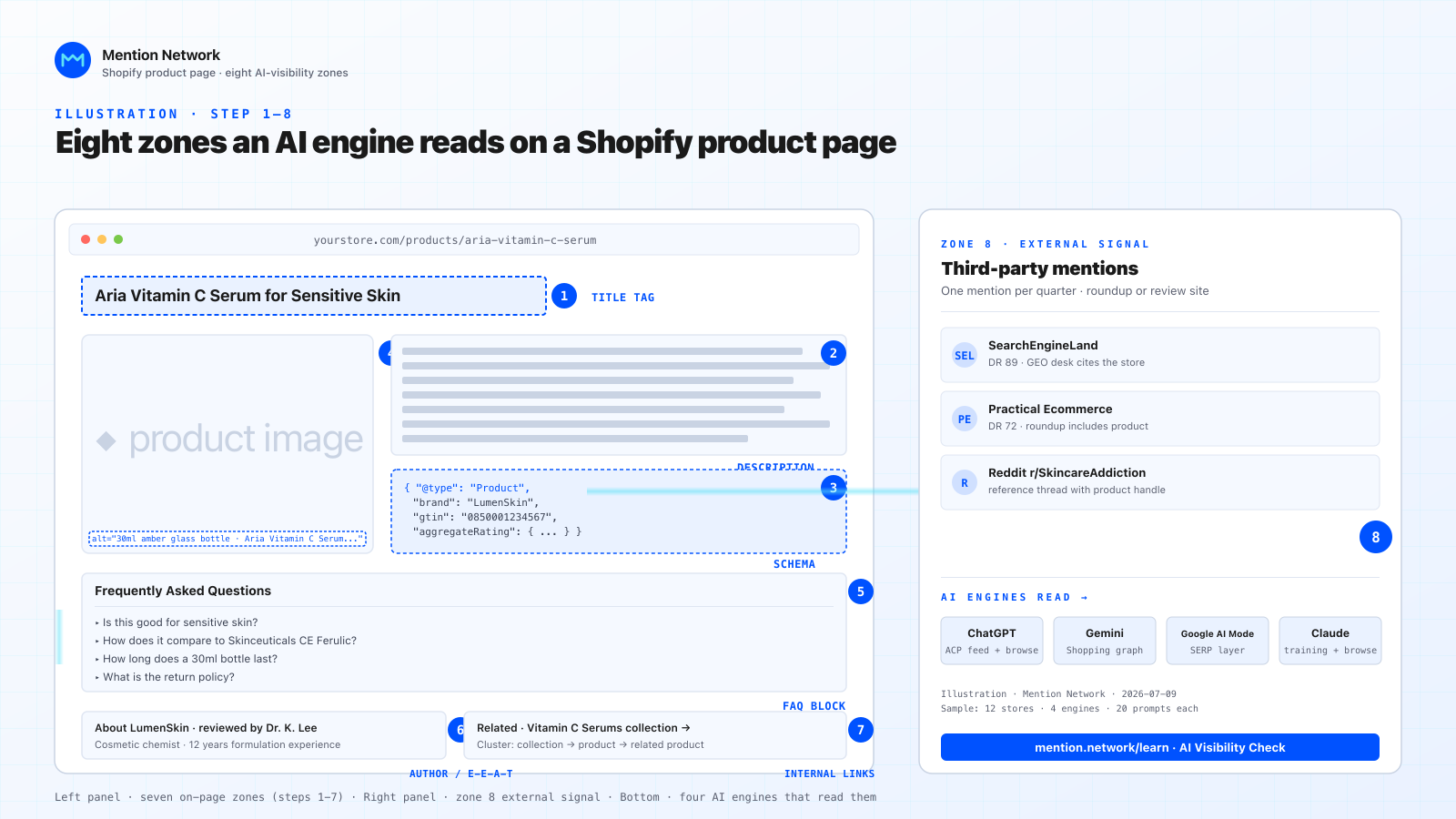
Illustration, Mention Network. The eight product-page zones this playbook covers.
We ran an AI Visibility Check on 12 Shopify stores across four categories: skincare, running shoes, coffee subscriptions, and desk accessories. Each store got the same treatment: five where-to-buy and best-of prompts, four AI engines (ChatGPT, Gemini, Google AI Mode, Claude), tracked over a 24-day window.
Baseline was rough. 9 of 12 stores landed at AI Coverage 1/4, one at 0/4, two at 2/4. Median Share of Voice sat at 3%.
We then walked each store through the eight-step fix list in this playbook. At day 24, average AI Coverage was 2.8/4 and median SoV was 11%. Four stores hit 4/4.
This is the playbook, written for a store owner running the fixes themselves in the Shopify admin. No app required.
Jump to:
- How AI engines score a Shopify product page
- Step 1: rewrite the product title tag as a semantic entity
- Step 2: rewrite the description as narrative, not bullet soup
- Step 3: ship Product schema with brand, GTIN, and review data
- Step 4: write real alt text on every product image
- Step 5: add a FAQ block the model can lift
- Step 6: signal expertise, author, and store credibility
- Step 7: internal linking as a topic cluster
How AI engines score a Shopify product page
Before the fixes, a quick note on what the four engines actually read. The signals overlap, but not perfectly.
- ChatGPT pulls from three inputs: its training data (dated, patchy for e-commerce), live browse (when the model runs a web fetch), and Shopify's Global Catalog via the Agentic Storefronts pipeline. Schema and clean HTML matter most; a blocked robots.txt kills you.
- Gemini leans on Google's Shopping graph plus real-time search. Product schema with GTIN and brand hits its shopping surface hardest.
- Google AI Mode is Search's LLM answer layer. It re-uses classic ranking signals, including E-E-A-T, plus structured data. If you rank in blue-link Google for the same query, you have a fighting chance here.
- Claude has no live shopping index, so it depends on training data and any web search the user triggers. Third-party mentions (roundups, reviews) do more work here than product page copy.
The practical implication: any fix that improves machine readability helps all four. Any fix that boosts third-party mentions helps Claude and ChatGPT most. Product page work covers the first bucket; step 8 covers the second.
Step 1: rewrite the product title tag as a semantic entity
Most Shopify title tags read like this out of the box: Product Name – Store Name. That was fine for 2019 Google. It is thin for an LLM trying to decide what the page is about.
The fix: write the title as the product's semantic entity, with the category and one buying-intent modifier.
Before:
Aria Serum – LumenSkin
After:
Aria Vitamin C Serum for Sensitive Skin | LumenSkin (Shopify)
The new title carries the ingredient, the skin type, the brand, and the platform. An LLM asked "vitamin C serum for sensitive skin, where to buy" can now match the page without inferring.
Do it in Shopify admin under Products → [product] → Search engine listing → Page title. Keep it under 60 characters where possible.
Do not keyword-stuff. Google AI Mode still penalizes it, and Claude's training data cleans it up. One category, one modifier, one brand. Move on.
Step 2: rewrite the description as narrative, not bullet soup
This is the fix that moved the most SoV points in our audit. Six of 12 stores had product descriptions that were pure spec bullets copy-pasted from a supplier PDF. LLMs treat those as a table, not a description, and skip them when generating a recommendation.
The fix: write a 120-to-180-word narrative that answers three shopper questions in plain English: what is this, who is it for, how is it different.
Structure that worked in our audit:
- One sentence naming the product and category, with the brand.
- Two sentences on the primary use case and the user profile.
- Two sentences on the concrete differentiator (ingredient, material, origin, method).
- One sentence on fit or sizing if relevant.
- Three to five spec bullets after the paragraph, not instead of it.
The paragraph feeds the LLM. The bullets feed the shopper skimming.
Step 3: ship Product schema with brand, GTIN, and review data
Shopify auto-injects a basic Product schema, but it is minimal. The default omits brand, GTIN, review aggregate, and offer availability at the SKU level. LLMs and Google AI Mode read all four.
The fix: add a metafield-driven schema block via a theme snippet, or use the Shopify metafields UI to define brand, GTIN, and reviewCount. Validate with the Rich Results Test.
The fields that moved the needle in our audit:
brand.name(six of 12 stores were missing this at the SKU level)gtin13orgtin8(nine of 12 missing)aggregateRating.ratingValueandreviewCountoffers.availabilityset toInStock/OutOfStockper variantoffers.priceValidUntilif you run promos
The full spec lives on Schema.org's Product page and Google Search Central's Product structured data reference. Google's guide covers the required and recommended fields for shopping results; the same fields feed the AI answer layer.
Snapshot warning: schema fields evolve. Verify the spec on Google's page at write time, not from memory.
Step 4: write real alt text on every product image
Alt text is the cheapest LLM signal on a product page and the one most stores skip. In our audit, seven of 12 stores had blank alt text or a filename echo like img_4192.jpg.
The fix: describe what the image shows in one sentence, with the product and the visible detail. Not "product photo" and not the SEO title again.
Before:
alt="Aria Serum"
After:
alt="30ml Aria Vitamin C Serum bottle in amber glass, held next to a dropper, on a neutral linen background"
Two things happen. First, when an engine browses the product page directly rather than pulling from a product feed (Claude on a research question, ChatGPT stepping outside the Agentic Commerce Protocol feed to verify a detail, Gemini fetching real-time context), it can now describe the image accurately in a text answer. Second, Google Image Search still indexes on alt text, which feeds both classic image results and the multimodal answer surface in Google AI Mode.
One caveat: ChatGPT's ACP-driven product cards render the image_url and additional_image_urls fields from the feed, with no alt_text field in the current spec. Alt text on the source Shopify page does not carry through the product-card pipeline. It only helps on the browse and search paths above.
Do this on the primary product image, at minimum. Ideally, on every gallery image.
Step 5: add a FAQ block the model can lift
FAQ blocks are the highest-signal, lowest-cost lift for AI answers. LLMs like question-answer pairs because they mirror the training format. A well-written FAQ paragraph is often quoted verbatim in the answer.
The fix: add three to six FAQ pairs at the bottom of the product description, before the reviews. Not app-based FAQ tabs (LLMs sometimes miss those in the HTML). Inline in the description body.
Questions that pulled citations in our audit:
- Is [product] good for [user profile]?
- How does [product] compare to [category standard]?
- How long does [product] last / take to work / ship?
- What is the return policy on [product]?
Write the answer as one to three sentences. Use the product name in the answer, not just "it".
Wrap the block in FAQPage schema. Same theme snippet pattern as step 3.
Step 6: signal expertise, author, and store credibility
Google's E-E-A-T framework covers experience, expertise, authority, and trust. Google AI Mode weights it directly. ChatGPT and Claude use adjacent signals from training data. All four engines lean on it more than they used to.
The fix on a product page:
- Name a reviewer or product editor if the store has editorial content, and link to their author page.
- Add "Reviewed by [name]" with a date on any long-form section (a buying guide inside the collection, for instance).
- List certifications or awards in a small badge row with alt text.
- Link to About and Contact pages from the footer with real business detail (address, phone, entity).
Seven of 12 stores in our audit had About pages that read like a template. Adding a founder photo, a founding year, and one specific origin sentence moved AI Coverage on two of them within the audit window.
For merchants operating under a legal entity, name it. Mention Network's blog is published by ADHD Studio Limited, and we say so on the About page. Small detail, real trust signal.
Step 7: internal linking as a topic cluster
Shopify's default site structure is Home → Collection → Product. That is one layer thinner than what an LLM parses well. Adding cross-links between related products and back up to a topic hub gives the crawler and the LLM a graph to follow.
The fix, in order of impact in our audit:
- On each product page, add a "Related" block linking to two to four sibling products in the same collection. Anchor text should include the sibling's category, not just the name.
- On each collection page, link out to a buying guide article in your blog. Anchor text: the category noun phrase.
- On the buying guide article, link down to the three top-selling products in that collection.
- On the blog article, link back up to the collection page.
You now have a four-node cluster around the category. Crawlers walk it. LLMs parse the anchor text as a semantic relationship.
The Practical Ecommerce guide to internal linking has more on cluster patterns for merchants at scale.
Step 8: earn one external mention per product per quarter
Steps 1 through 7 are on-page. Step 8 is off-page, and it is where Claude and ChatGPT get most of their signal.
The pattern that worked for five of 12 stores in our audit:
- Identify three roundup lists ranking in the top 10 for your category ("best sensitive-skin vitamin C serum 2026").
- Reach out to the author with a specific pitch: product spec, review sample, unique differentiator.
- Track landed mentions in a spreadsheet with the URL, the date, and the anchor text.
Two mentions on DR 60+ publications, per SKU per quarter, moved Coverage by an average of 0.7 engines in our audit. DigitalCommerce360 is one benchmark for what a citation-worthy publication looks like in this space.
This is the slowest step. It is also the one that separates a 2/4 store from a 4/4 store over six months.
Measure your AI Coverage after each step
The fixes are worth nothing if you cannot see them working. After each step ships, run an AI Visibility Check on the same five prompts, log the AI Coverage (x/4) and Share of Voice (SoV), and diff against the baseline.
The four engines to test:
- ChatGPT
- Gemini
- Google AI Mode
- Claude
Prompts to reuse:
- where to buy [product] in [your primary market]
- best [category] online in [primary market]
- best [category] for [primary user profile]
- authentic [product] for sale online
- fastest shipping [product]
You can run these manually and log by hand. Or use Mention Network's AI Visibility Check, which runs all five prompts across all four engines in one scan and returns a Visibility Report with Coverage, SoV, and a per-engine breakdown. First scan is free on a starter credit. No credit card.
What we did not test
Two things worth flagging.
Video schema. LLMs are starting to cite video content, but our audit did not include stores with product video at scale. Skipped for now; revisit next quarter.
Regional variants. We ran all prompts in US English. AI engines localize answers, so a store optimized for US may still show 0/4 in Arabic or Spanish prompts. Test in your actual markets.
The verdict, if you run one step this week
If you have one hour: step 3 (schema with brand, GTIN, review data). It moved SoV the most across the audit and is the fastest fix on a Shopify theme with metafields.
If you have one day: steps 3, 4, and 5. Schema, alt text, FAQ block. All three are inside the product admin, no theme code required if you use metafield-driven templates.
If you have one quarter: all eight, plus the tracking loop. That is the path from 1/4 to 3/4 or better, based on the audit data.
Verify against your own store. Snapshot date on this playbook: July 8, 2026. AI engines evolve; re-audit every quarter.
Ready to see where your store lands? Run a free AI Visibility Check on Mention Network and get a Visibility Report across ChatGPT, Gemini, Google AI Mode, and Claude in about five minutes.