
Shopify to WooCommerce Migration: Move Your Store to WordPress (2026)
A complete 2026 guide to migrating Shopify to WooCommerce: why owners switch to WordPress, the best migration tools, a step-by-step process, real costs, and how to protect your SEO and AI visibility in the move.

Not every store is heading to Shopify. A steady stream of owners go the other way, and the searches show it: "Shopify to WordPress" alone pulls hundreds of US searches a month, with a cluster of "migrate," "move," and "transfer" queries around it. If you're leaving Shopify for WooCommerce, this guide covers the whole move: why owners do it, which tools to use, the exact steps, the costs, and how to keep your search traffic through the switch.
A quick honesty note before we start. We're not WooCommerce or Shopify, and we're not here to talk you into either one. We help stores measure how AI assistants recommend them on any platform, so we can lay out this move straight. If you're going the other direction, we also have a guide to migrating WooCommerce to Shopify.
What you'll learn:
- How common is it to leave Shopify for WooCommerce?
- Why move from Shopify to WooCommerce?
- The tools you'll use
- How to migrate Shopify to WooCommerce, step by step
- What it costs
- Protect your SEO and AI visibility
- After the move: make sure AI still recommends you
- Frequently asked questions
How common is it to leave Shopify for WooCommerce?
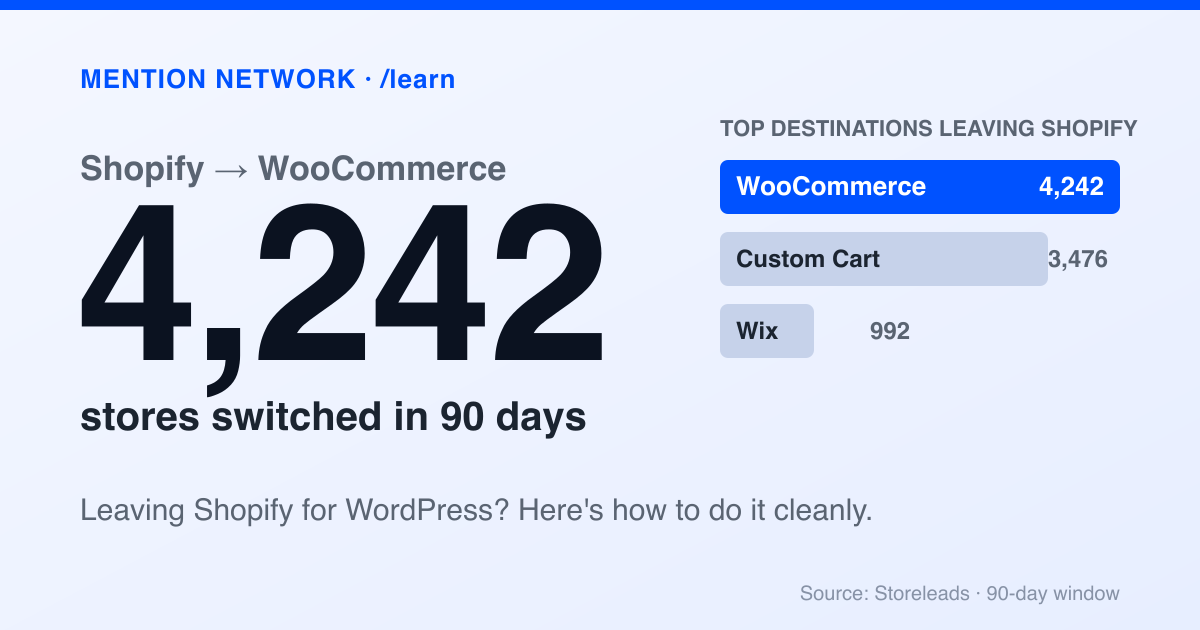
Common enough that WooCommerce is the top destination for stores leaving Shopify. Platform-tracking data from Storeleads (90-day window, accessed July 7, 2026) shows Shopify lost 12,890 merchants to other platforms, and WooCommerce took the largest share at 4,242 stores, ahead of Custom Cart (3,476) and Wix (992).
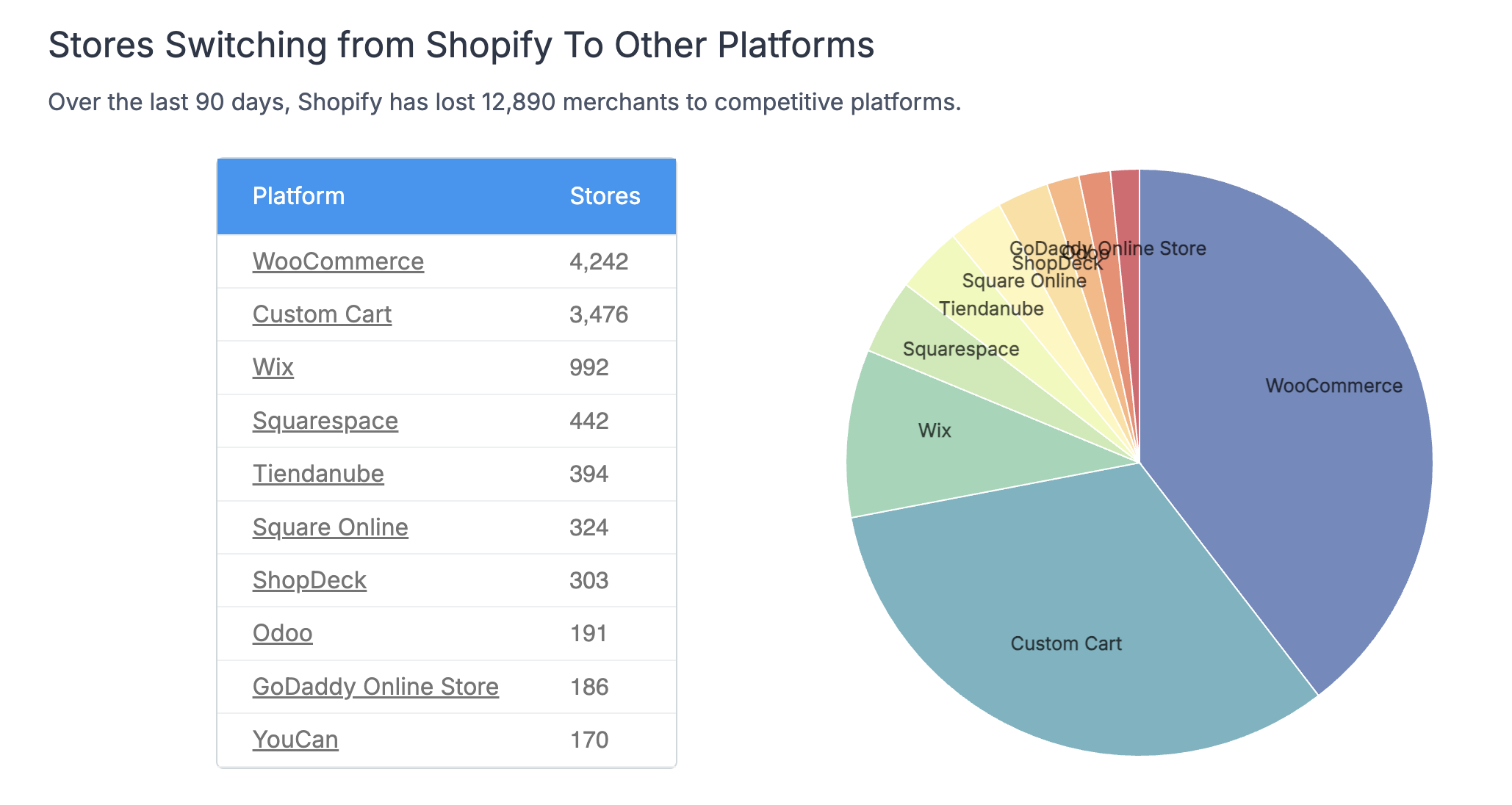
WooCommerce is the top destination for stores leaving Shopify. Source: Storeleads, 90-day window, accessed July 7, 2026.
For context, the flow toward Shopify from WooCommerce is larger than the flow back (9,368 vs 4,242 over the same period), so more stores move to Shopify than leave it for WooCommerce. But 4,242 in 90 days is a real, active path, and this guide is how to walk it cleanly.
Why move from Shopify to WooCommerce?
Be clear about your reason, because this move is more work than the reverse and only pays off if the destination fits.
Owners leave Shopify for WooCommerce mostly for two things: control and cost. WooCommerce is free and open-source, so you drop Shopify's monthly fee and any transaction costs, and you gain full control over your store's code, data, hosting, and functionality. If you run a content-heavy business on WordPress, folding commerce into the same system is a real advantage.
The trade-off is ownership. Shopify handled hosting, security, and updates for you. On WooCommerce, that's your job now, or your developer's. You're buying freedom and paying for it in maintenance.
Move to WooCommerce if you want to cut recurring platform fees, you need control Shopify won't give you, you already live in WordPress, or you have the technical skills to run a self-hosted store. Stay on Shopify if you'd rather someone else handle hosting and security, you value predictable costs, or you're not technical and don't want to be. If you're still weighing it, our Shopify vs WooCommerce comparison breaks down the trade-offs.
The tools you'll use
Two kinds of tools move a Shopify store to WooCommerce.
Automated migration services. LitExtension and Cart2Cart both run migrations in this direction, transferring products, customers, and orders for you. They're the fastest route and priced by how much data you move. LitExtension carries strong ratings and supports transfers to WooCommerce as well as to Shopify, so the same well-known name works either way.
WooCommerce's own CSV importer. WooCommerce includes a built-in product CSV importer, free. You export your catalog from Shopify, format it for WooCommerce, and import. It's the budget path, and it handles products well, but orders and customers usually need a plugin or a manual approach. Good for smaller catalogs where you'd rather not pay for a service.
Whichever you choose, run a small test import first. Move a handful of products, confirm images, variants, and prices land correctly, and only then commit to the full transfer.
How to migrate Shopify to WooCommerce, step by step
The data transfer is one part. The setup around it is what makes WooCommerce feel like a real store.
1. Export your Shopify data
From your Shopify admin, export products, customers, and orders to CSV. Save your product images and any content pages too. This is your source of truth for the move and your backup if anything goes wrong.
2. Set up WordPress and WooCommerce
Because WooCommerce is self-hosted, you build the foundation first. Buy hosting and a domain, install WordPress, then install and configure the free WooCommerce plugin. This is the step that doesn't exist on Shopify, and it's where most of the extra effort lives.
3. Import your data
Point your migration tool at your Shopify export, or use WooCommerce's CSV importer for products. Map the fields carefully, run a small test batch, then import the full set. Check that variants, images, and prices come across intact.
4. Rebuild what doesn't transfer
Some things don't migrate and have to be set up fresh on WooCommerce: your theme and design, a payment gateway, and shipping and tax rules. Shopify's checkout and payments are Shopify's; on WooCommerce you'll connect your own gateway like a WordPress payments plugin or Stripe. Budget real time for this part.
5. Set up 301 redirects
Your Shopify URLs and WooCommerce URLs won't match, so redirect every old link to its new home with a 301. This is the step that protects your rankings, and the one stores most often skip and regret. Map product, collection, and page URLs one to one.
6. Test everything, then go live
Before you switch your domain, check the new store carefully: product counts, images, collections, a sample of orders and customers, and a full test checkout with your live payment gateway. Confirm your redirects resolve. Then point your domain at WordPress and go live.
What it costs
The math flips compared to Shopify. There's no monthly platform fee, but the costs move into pieces you now own.
WooCommerce is free. You'll pay for hosting, a domain, a theme if you want a premium one, an SSL certificate, and any paid extensions for features Shopify bundled in. If you use an automated migration service, that's a one-time cost scaled to your data. And factor in your own time, or a developer's, for the WordPress and payments setup that Shopify handled for you.
The honest summary: WooCommerce trades a predictable monthly bill for a pile of smaller, variable costs plus more of your time. It can genuinely be cheaper, especially at scale, if you're equipped to run it yourself.
Protect your SEO and AI visibility
A platform change is a rankings risk in both directions. The rule is the same leaving Shopify as entering it: redirect everything, and verify your on-page SEO survived.
Set up those 301 redirects from every Shopify URL to its WooCommerce match. Then check that titles, meta descriptions, image alt text, and structured data carried over, rather than assuming they did. WooCommerce on WordPress actually gives you more hands-on control here once you're set up, which is part of the appeal for SEO-focused owners.
There's a newer layer too. Shoppers ask ChatGPT, Gemini, and Google AI what to buy, and a platform switch can change whether those assistants still recognize and recommend your store. Whichever platform you land on, a migration is the right moment to re-check your AI visibility, not just your Google rankings. Our guide on how to optimize your store for ChatGPT Shopping applies to WooCommerce stores just as much as Shopify ones.
After the move: make sure AI still recommends you
Once you're live on WooCommerce, the setup is behind you. The question that shapes your next year is quieter: when a shopper asks an assistant for a recommendation in your category, does your store come up?
That doesn't care which platform you chose, and it's easy to baseline. Checking it right after a migration tells you whether the move changed how AI describes and recommends you.
Is AI recommending your store? Check free.
Frequently asked questions
Why would I migrate from Shopify to WooCommerce?
Owners usually move to WooCommerce for control and cost. WooCommerce is free and open-source, so you avoid Shopify's monthly fee and transaction costs, and you get full control over your store's code, data, and hosting. It suits technical owners, or those who run content and commerce together on WordPress.
Is it hard to migrate Shopify to WooCommerce?
It's more work than the reverse, because WooCommerce is self-hosted. You set up WordPress and hosting yourself, and you rebuild payments, shipping, and your theme, which don't transfer. A migration tool handles the product, customer, and order data, but the surrounding setup is on you.
Will I lose SEO moving from Shopify to WooCommerce?
Only if you skip redirects. Set up 301 redirects from every old Shopify URL to its new WooCommerce URL, and most of your ranking signals carry over. Migrating without redirects is the main reason stores lose traffic after a platform change.
How much does it cost to move from Shopify to WooCommerce?
WooCommerce itself is free, but you pay for hosting, a domain, a theme, and any paid extensions, plus a migration tool if you use one. The trade-off is no monthly platform fee, in exchange for taking on hosting and maintenance costs and work yourself.
Can I move my orders and customers from Shopify to WooCommerce?
Yes, but it takes the right tool. Automated services like LitExtension and Cart2Cart move products, customers, and orders together. WooCommerce's free CSV importer handles products well, while orders and customers usually need a plugin or a manual export-import. Run a test batch first to confirm the data maps correctly.