
WooCommerce to Shopify Migration: The Complete 2026 Guide
A complete 2026 guide to migrating WooCommerce to Shopify: whether you should switch, the best migration apps compared, a step-by-step process, real costs, and how to keep your SEO and AI visibility intact.

Moving a store off WooCommerce isn't a small decision, and the search data shows people wrestling with it: "WooCommerce or Shopify" pulls over a thousand US searches a month, and a whole family of "migrate," "move," and "switch" queries sit right behind it. If you're weighing the jump, this guide covers the full path: whether to switch at all, which app to use, the exact steps, what it costs, and how to keep your search traffic through the move.
We checked the app data on the Shopify App Store on July 7, 2026. Pricing shifts, so treat the numbers here as ballpark and confirm on each app's page before you buy.
What you'll learn:
- How many stores actually move from WooCommerce to Shopify?
- Should you move from WooCommerce to Shopify?
- The best WooCommerce to Shopify migration apps
- How to migrate WooCommerce to Shopify, step by step
- What it costs
- Don't lose your search visibility in the move
- After you migrate: make sure AI still recommends you
- Frequently asked questions
How many stores actually move from WooCommerce to Shopify?
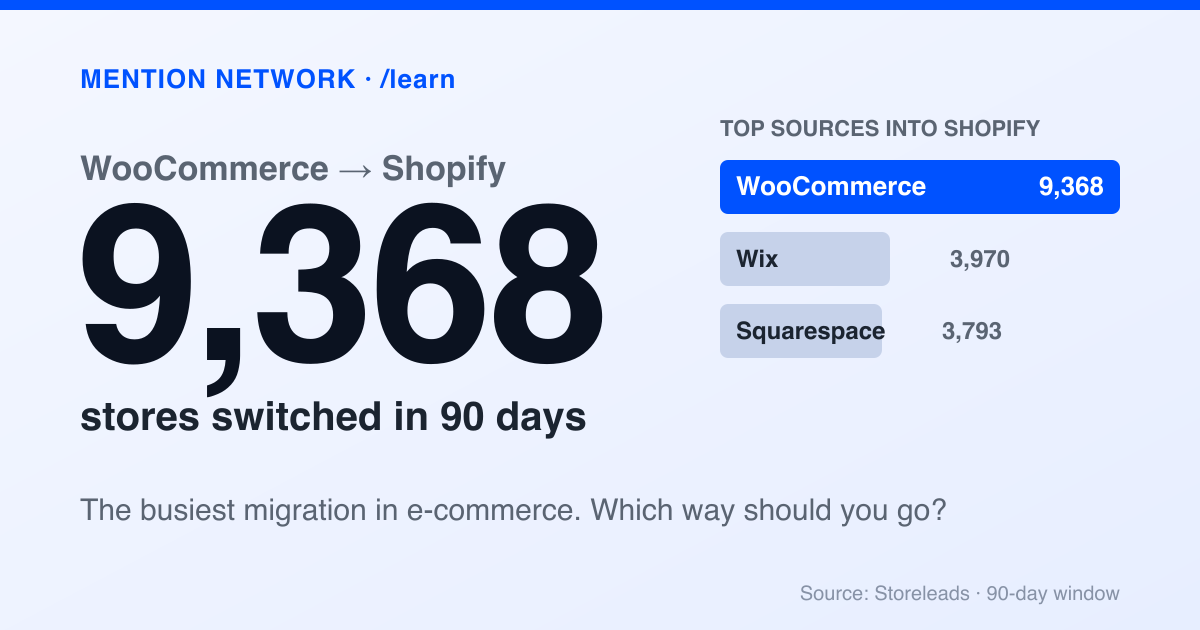
You're not making an unusual choice. WooCommerce is the single biggest source of stores switching to Shopify. According to platform-tracking data from Storeleads (90-day window, accessed July 7, 2026), Shopify gained 25,359 merchants from other platforms, and WooCommerce led every source by a wide margin at 9,368 stores, more than Wix (3,970) and Squarespace (3,793) combined.
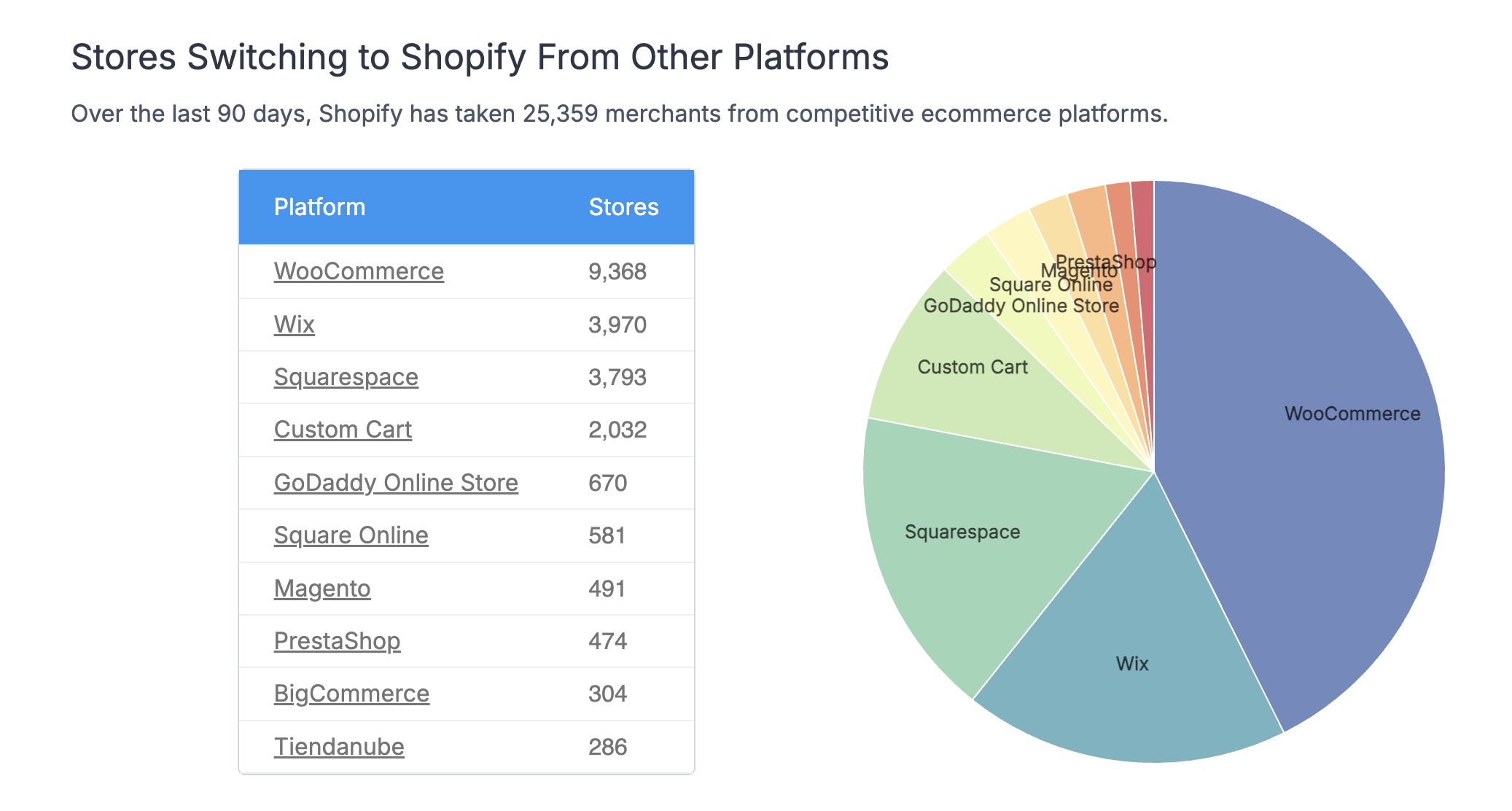
WooCommerce is the top source of stores switching to Shopify. Source: Storeleads, 90-day window, accessed July 7, 2026.
That volume is why the migration path is well worn and the tools below are mature. The move you're weighing is one thousands of stores make every quarter.
Should you move from WooCommerce to Shopify?
Start with the honest version: WooCommerce is a great platform, and switching is real work. Do it because Shopify solves a problem you actually have, not because a comparison post told you to. If you are still deciding between the two, our Shopify vs WooCommerce comparison weighs them side by side.
WooCommerce gives you full control and no platform fee, but you own the whole stack: hosting, security, plugin conflicts, and the updates that keep it all running. Shopify takes that off your plate as hosted, managed commerce, in exchange for a monthly fee and less low-level control.
Here's the short version of who should switch.
Move to Shopify if you're spending more time maintaining your store than selling on it, your WooCommerce site has gotten slow or fragile under a pile of plugins, or you want checkout, hosting, and security handled for you. Shopify also has the deeper bench for AI shopping, which matters more every quarter as buyers ask assistants what to buy.
Stay on WooCommerce if you need total control over data and functionality, you run content and commerce tightly together on WordPress, or your margins can't absorb a monthly platform fee. There is no shame in staying; the best platform is the one that fits how you actually work. (Going the other way instead? See our guide to migrating Shopify to WooCommerce.)
If you land on switching, the rest of this guide is the how.
The best WooCommerce to Shopify migration apps
You don't move the data by hand. A migration app connects to your WooCommerce store, reads your products, customers, and orders, and writes them into Shopify. Here are the ones worth shortlisting, with their App Store ratings as of July 7, 2026.
| App | Rating | Reviews | Pricing model | Best for |
|---|---|---|---|---|
| LitExtension Store Migration | 4.8 | 306 | One-time, by data volume | Widest platform coverage; Built for Shopify |
| MigrationPro | 5.0 | 177 | Free to install, paid transfer | Guided all-in-one migration |
| Matrixify | 4.9 | 1,328 | Free plan, then monthly | Large catalogs via Excel/CSV |
| Cart2Cart | n/a* | n/a* | One-time, by data volume | Automated transfer, no downtime |
| Migratify | 4.4 | 50 | Free plan, then monthly | AI-assisted product import |
*"n/a" means the figure wasn't on the App Store category page we checked; confirm it on the app's own listing.
A few notes to pick between them.
LitExtension is the most established name here. It carries Shopify's "Built for Shopify" badge, supports 140+ source platforms, and moves products, orders, customers, collections, inventory, reviews, metafields, and 301 redirects. If you want a proven, all-in-one service and don't mind a one-time fee scaled to your data, start here.
MigrationPro carries a perfect 5.0 rating across 177 reviews and runs a guided, no-code flow covering products, customers, orders, collections, images, URLs, and redirects. It's the friendliest option if you want the app to hold your hand.
Matrixify is the outlier and the most-reviewed app in the category by a wide margin (1,328 reviews). It works through Excel and CSV files rather than a point-and-click wizard: you export data into its template, map the fields, and import. That's more control and more manual effort, which suits large or unusual catalogs.
Cart2Cart and Migratify round out the shortlist. Cart2Cart is a long-running automated migration service billed by data volume, and Migratify leans on AI to import products from 100+ platforms on a monthly plan.
Whichever you pick, use its free demo or sample migration first. Every one of these lets you move a small batch before you commit, and that trial run is the cheapest insurance you'll buy in this whole process.
How to migrate WooCommerce to Shopify, step by step
The apps automate the data transfer. The steps around it are what keep the move clean.
1. Back up everything first
Before you touch anything, take a full backup of your WooCommerce database and files, and export your products, orders, and customers to CSV. You almost certainly won't need it, but a migration is exactly the wrong time to be without a safety net.
2. Set up the Shopify side
Create your Shopify account and pick a plan, add your custom domain, and choose a theme. The destination needs to exist before data can land in it. You don't have to finish the design now; you just need a store that can receive products.
3. Connect your migration app
Install your chosen app from the Shopify App Store and connect your WooCommerce store as the source. This usually means entering your WooCommerce site URL and API credentials, or installing a small connector on the WordPress side. The app's setup wizard walks you through it.
4. Run a demo, then the full migration
Run the free demo migration first. It moves a handful of products and orders so you can confirm the mapping is right, images come across, and prices and variants line up. When the sample looks correct, run the full transfer. For a typical catalog this takes a few hours; large stores can run overnight.
5. Set up 301 redirects
This is the step stores skip and regret. Your WooCommerce URLs and your new Shopify URLs won't match, so every old link, including the ones Google has indexed, needs a 301 redirect to its new home. Apps like LitExtension and MigrationPro can generate these for you. Without them, you lose the rankings you spent years earning.
6. Verify, test, and go live
Before you flip the domain, check the migrated store carefully: product counts, images, collections, variants, and a sample of orders and customers. Run a test checkout end to end. Confirm your redirects resolve. Only then point your domain at Shopify and go live.
What it costs
The migration app is the line item people ask about, and it's usually the smallest cost of the whole move. For a mid-sized store, a one-time service like LitExtension or Cart2Cart tends to run a few hundred dollars, priced by how many products, orders, and customers you move. Subscription tools like Matrixify and Migratify start with a free tier and charge monthly for larger jobs.
The bigger costs are the ones that don't show up on an invoice: your Shopify subscription going forward, any paid theme or apps you add, and your own time setting up and checking everything. Budget for the time more than the tools.
Don't lose your search visibility in the move
A migration is a rankings risk and an opportunity in the same motion. Handle redirects well and you keep most of your SEO. Handle them badly and you can watch months of traffic evaporate.
Two things protect you. First, the 301 redirects above, mapped from every old URL to its new one. Second, a check of your on-page SEO after the move: titles, meta descriptions, image alt text, and structured data should all survive the transfer, but verify them rather than assume.
There's a newer layer to watch, too. Shoppers increasingly ask ChatGPT, Gemini, and Google AI what to buy, and a platform change can shift whether those assistants still recognize and recommend your store. If AI visibility is part of your traffic, treat the migration as a moment to re-check it, not just your Google rankings. Our guide on how to optimize your store for ChatGPT Shopping covers what AI assistants look for.
After you migrate: make sure AI still recommends you
Once you're live on Shopify, the plumbing is done. The question that decides your next year of growth is quieter: when a shopper asks an assistant for a recommendation in your category, does your new store show up?
That's a measurement problem, and it's easy to check. Before and after a migration is the ideal time to baseline it, so you can see whether the move helped or hurt how AI describes and recommends you.
Is AI recommending your store? Check free.
Frequently asked questions
How long does a WooCommerce to Shopify migration take?
With a migration app, the automated data transfer for a typical catalog runs in a few hours to a day, depending on how many products, orders, and images you have. The manual work around it, theme setup, checking data, and redirects, usually takes longer than the transfer itself.
Will I lose my SEO rankings when I move from WooCommerce to Shopify?
Not if you set up 301 redirects from every old WooCommerce URL to its new Shopify URL. Redirects pass most of your ranking signals to the new pages. Migrating without redirects is the main reason stores lose traffic after a switch.
How much does it cost to migrate WooCommerce to Shopify?
The migration app is the main cost. One-time services like LitExtension or Cart2Cart typically run a few hundred dollars for a mid-sized store, priced by how much data you move, while tools like Matrixify use a monthly plan. Confirm current pricing on each app's page, since it changes.
Can I migrate WooCommerce to Shopify without losing orders and customers?
Yes. The main migration apps transfer products, customers, and order history together. Run a free demo migration on a small sample first to confirm the data maps correctly before you move everything.
Should I migrate from WooCommerce to Shopify at all?
Switch if you're spending more time maintaining WooCommerce than selling, or you want hosting, security, and checkout handled for you. Stay if you need full control over your stack or run content and commerce tightly together on WordPress. The move is worth it when platform maintenance is costing you selling time.