Inside an AI Visibility Check: How the Engine Actually Works
Pressing "Check" does not just ask ChatGPT one question. Follow an AI Visibility Check through six steps, from your catalog and the managed-or-BYOK choice to a versioned question set, four AI engines, and a frozen report.

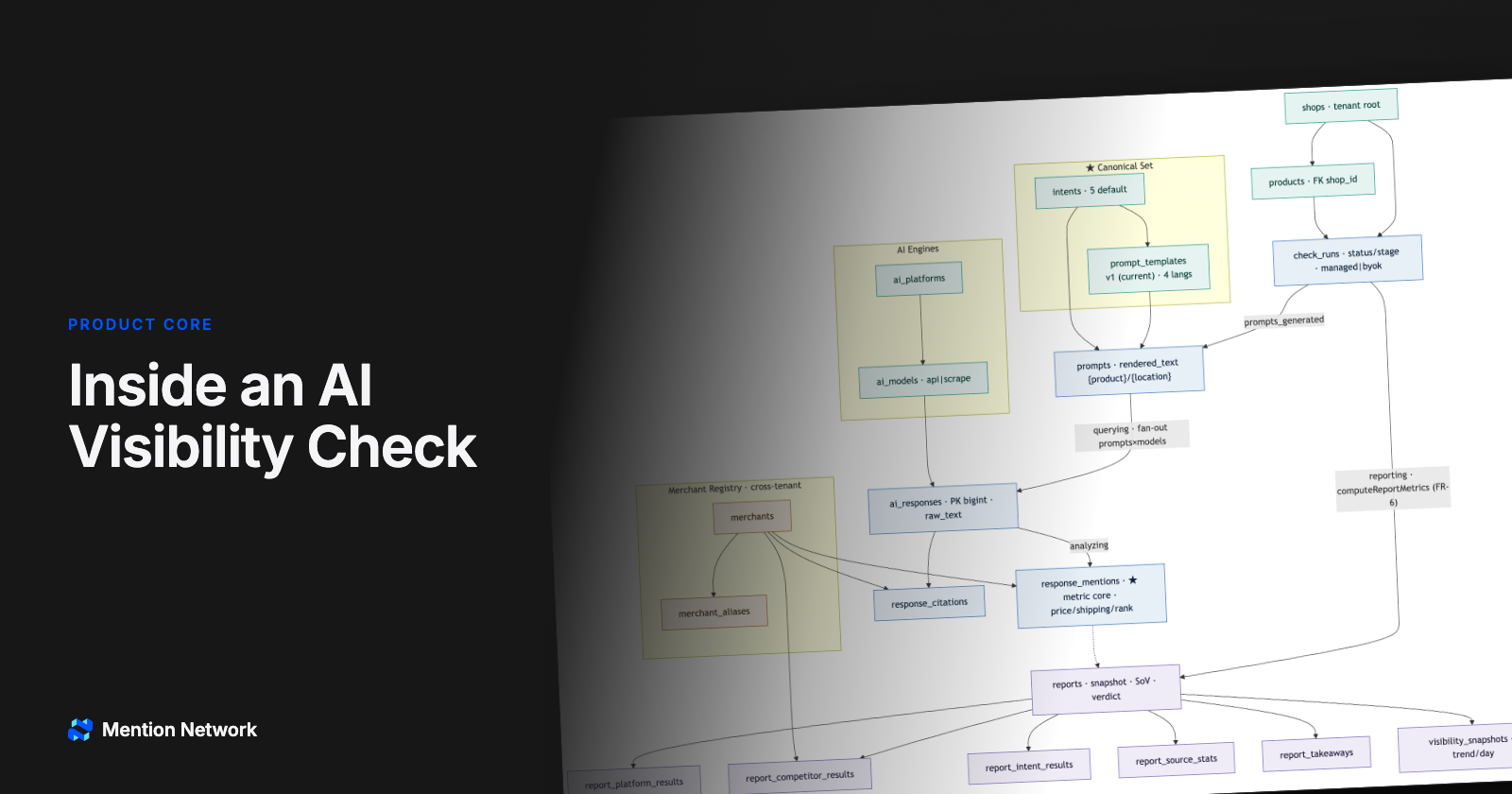
TL;DR: An AI Visibility Check does not just ask ChatGPT one question and copy the answer. Behind the button sits a six-step engine. It pulls the real product from your store and lets you choose how to run it: Mention Network runs it, or you bring your own AI keys. It asks a standard, versioned question set. It queries four AI models at once. It turns every answer into numbers and saves a frozen report with the raw AI text as proof. That pipeline is why the final number is trustworthy, and why this is a measurement tool, not a thin ChatGPT wrapper.
The six steps (jump ahead):
- How an AI Visibility Check starts: your store and catalog
- Two ways to run it: managed or BYOK
- A standard question set, versioned
- Why the AI visibility engine asks four models
- Turning AI answers into numbers
- A frozen report you can trust
A merchant we will call Linh presses one button in her Shopify admin: "Check AI Visibility". She picks a product, a COSRX 5-PDRN serum, plus a location (Dubai) and a language (English). Thirty seconds later she has a report that tells her where her store ranks when a shopper asks an AI "where can I buy this?".
That question matters more every quarter. Adobe Analytics found that traffic to U.S. retail sites from generative AI sources rose 1,200% in February 2025 versus July 2024, and that 39% of U.S. consumers have already used generative AI to shop (Adobe, March 17, 2025). So the real question for a store is simple: when the AI answers, are you in it? That is the heart of AI product visibility: being named as a place to buy.
From the outside, an AI Visibility Check looks like the app just asked ChatGPT and pasted the reply. If that were true, it would be a ChatGPT wrapper: a thin shell that forwards your question and shows the answer, nothing more. Open the hood, though, and the diagram below shows a whole pipeline between the button and the number. This piece walks that pipeline and explains why each step exists.
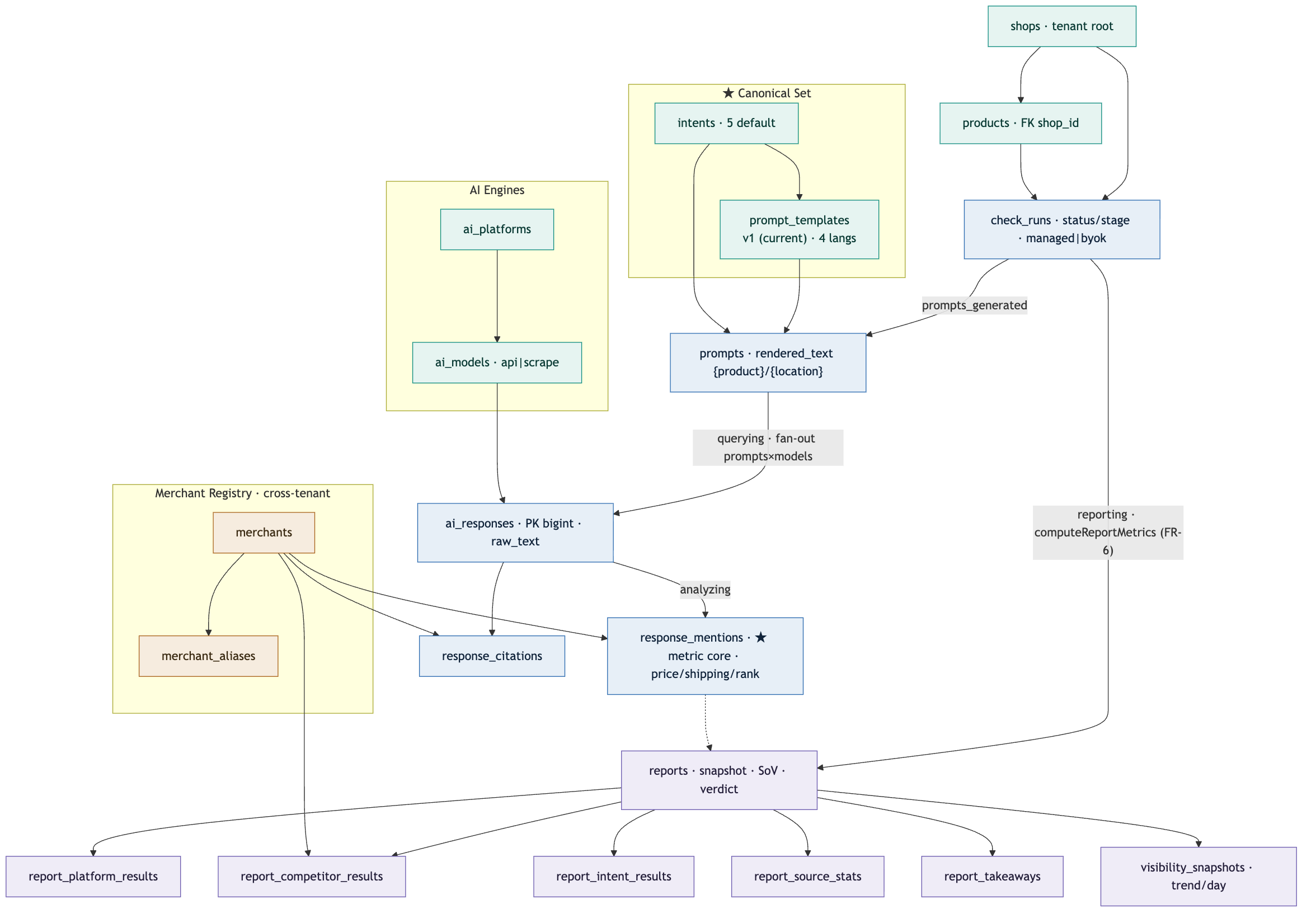
Read the schema-flow from the top right (shops and products), down through check_runs, prompts, and ai_responses, to response_mentions (where text becomes numbers), then out to reports and the report_* tables. The six sections below zoom into each cluster.
How an AI Visibility Check starts: your store and catalog
Everything begins with two boxes on the right of the diagram: shops (the root of a tenant) and products (the catalog tied to that shop).
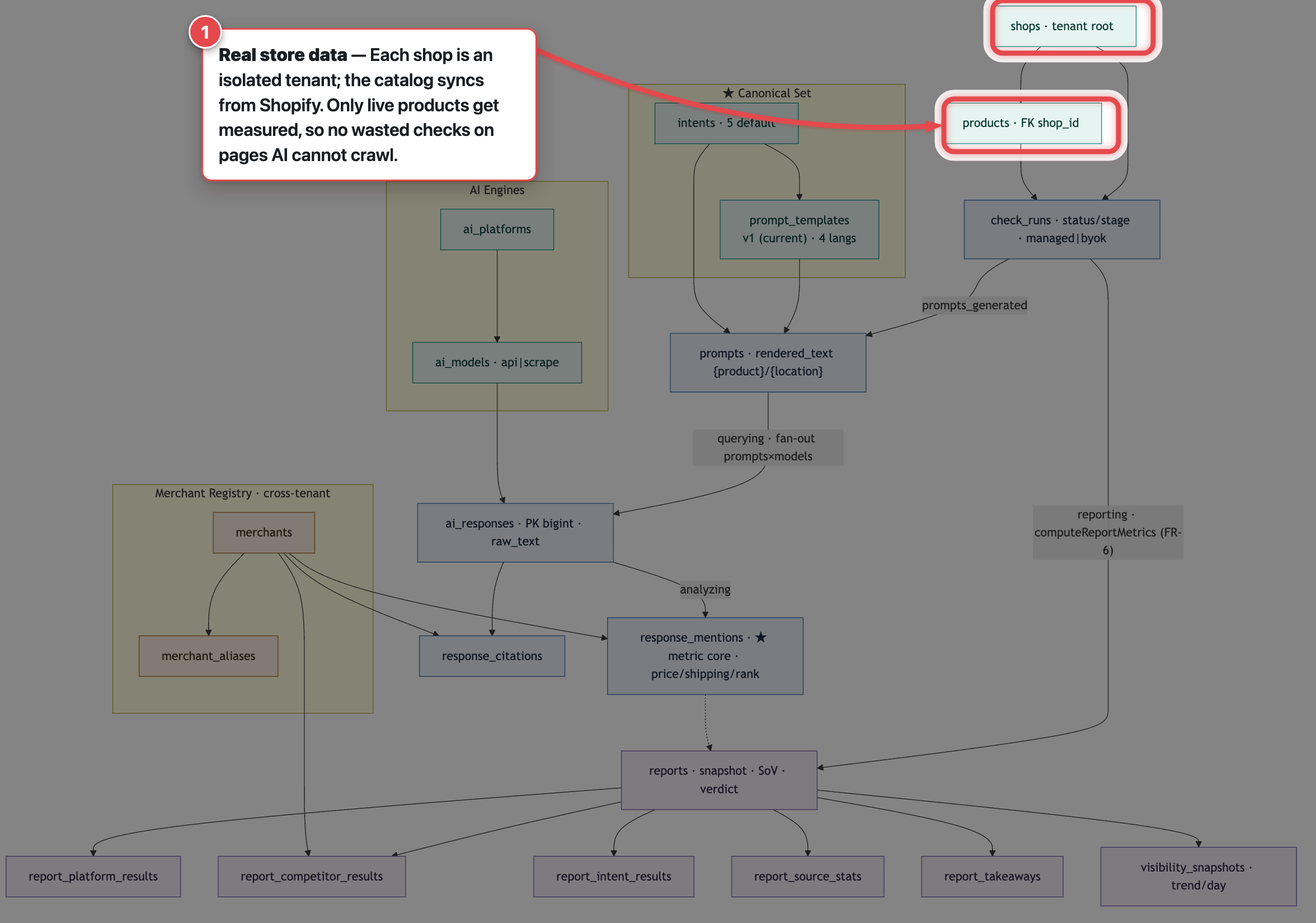
When Linh installs the app, her store becomes a tenant, an isolated data space separate from every other shop. The catalog syncs straight from Shopify, so when she runs a check she picks a real product from her own store, not a name she typed by hand.
One small but very product-minded detail: the engine only measures products that are already live. If a product page is still a draft, Google and the AI models cannot crawl it, so the result is guaranteed to be a meaningless "not visible". Instead of wasting a measurement on that, the app softly blocks it and prompts her to publish first. The engine is built so it never measures what it already knows is pointless.
Two ways to run it: managed or BYOK
Linh's click creates a check_runs record, a request to measure exactly one combination: one product, one location, one language. That record moves through several stages, so she sees a live screen ("asking ChatGPT, then Gemini...") instead of a dead spinner.
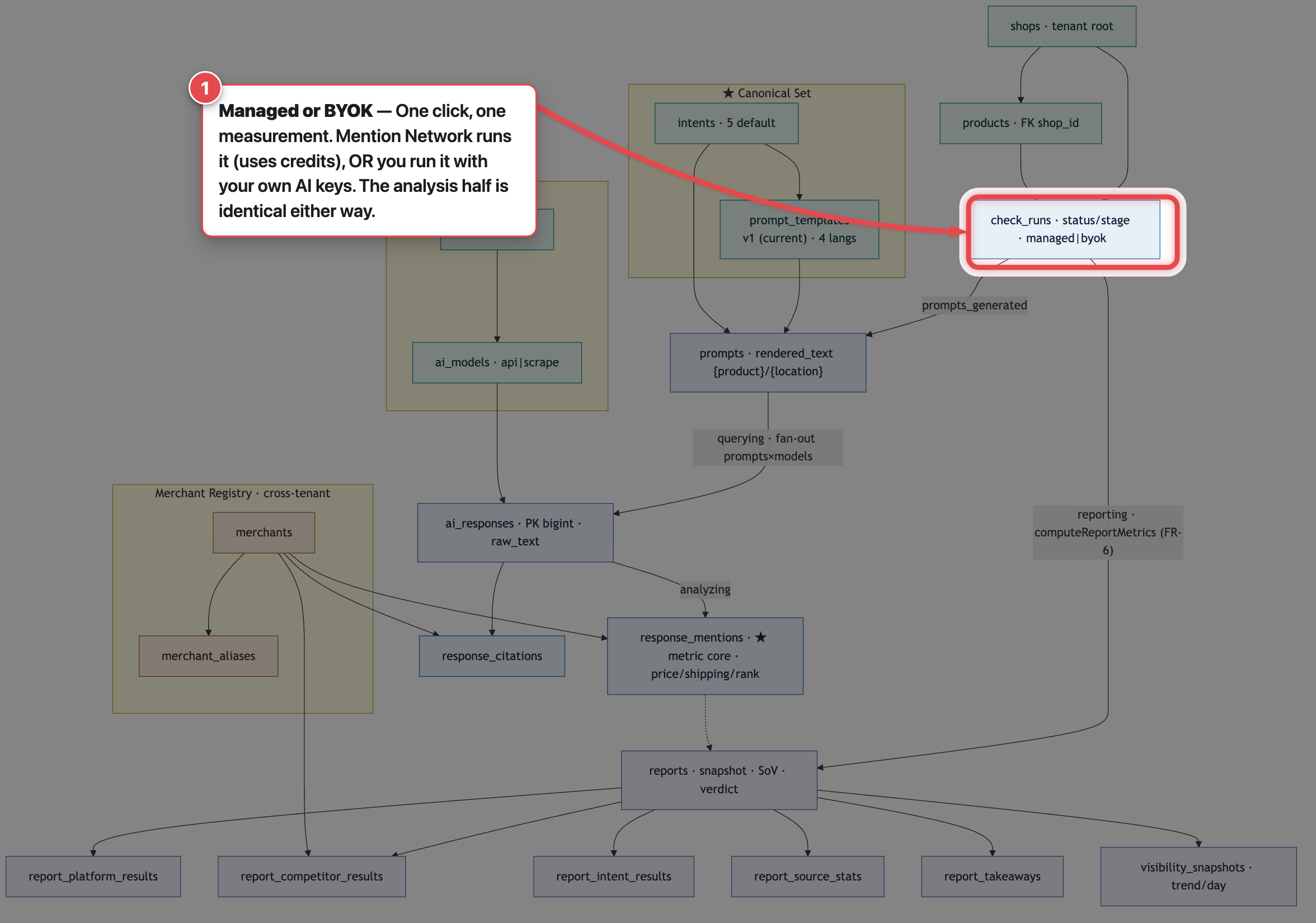
Notice the label on that box: managed | byok. It is not decoration. It marks two ways to run the same measurement:
- Managed. Mention Network runs the questions on its own AI accounts and charges your credits. This is the default, with nothing for you to configure.
- BYOK (bring your own key). You (or an AI agent, or the AI Visibility Studio desktop app) run the same question set with your own AI keys, then send only the results back for analysis. The key point: your key never leaves your machine. The backend does not store, proxy, or see it. You pay for the AI directly, so you can run as many reports as you like.
Here is the part worth pausing on: whichever lane you use, the second half of the pipeline, the analysis and the report, is identical. BYOK feeds straight into the same query step as managed, then joins the same analysis queue. Same measurement engine; the only difference is who presses run and who pays the AI bill. That openness is the point: you can use your own AI account and still get the same report as everyone else.
In return, BYOK asks you to supply the "AI fuel" yourself. To match a managed run exactly, you need access to all four engines first: an API key or SDK for ChatGPT (OpenAI), Gemini, and Claude, plus a way to reach Google AI Mode (this one is not a plain API key; it needs a page-reading route such as SerpAPI or browser automation). With all four in place the later steps run in full; miss an engine and that engine's slot is skipped, so the result will not fully match managed. (For the wider picture, see our guide to what Mention Network is.)
A standard question set, versioned
The engine does not ask a random question. It uses a shared, standard question set (the Canonical Set cluster in the diagram): five buyer intents (where to buy, best place to buy, authentic, cheapest, free shipping), each with a ready template per language. The engine drops your product name and location into the blanks to build the real question it sends to the AI.
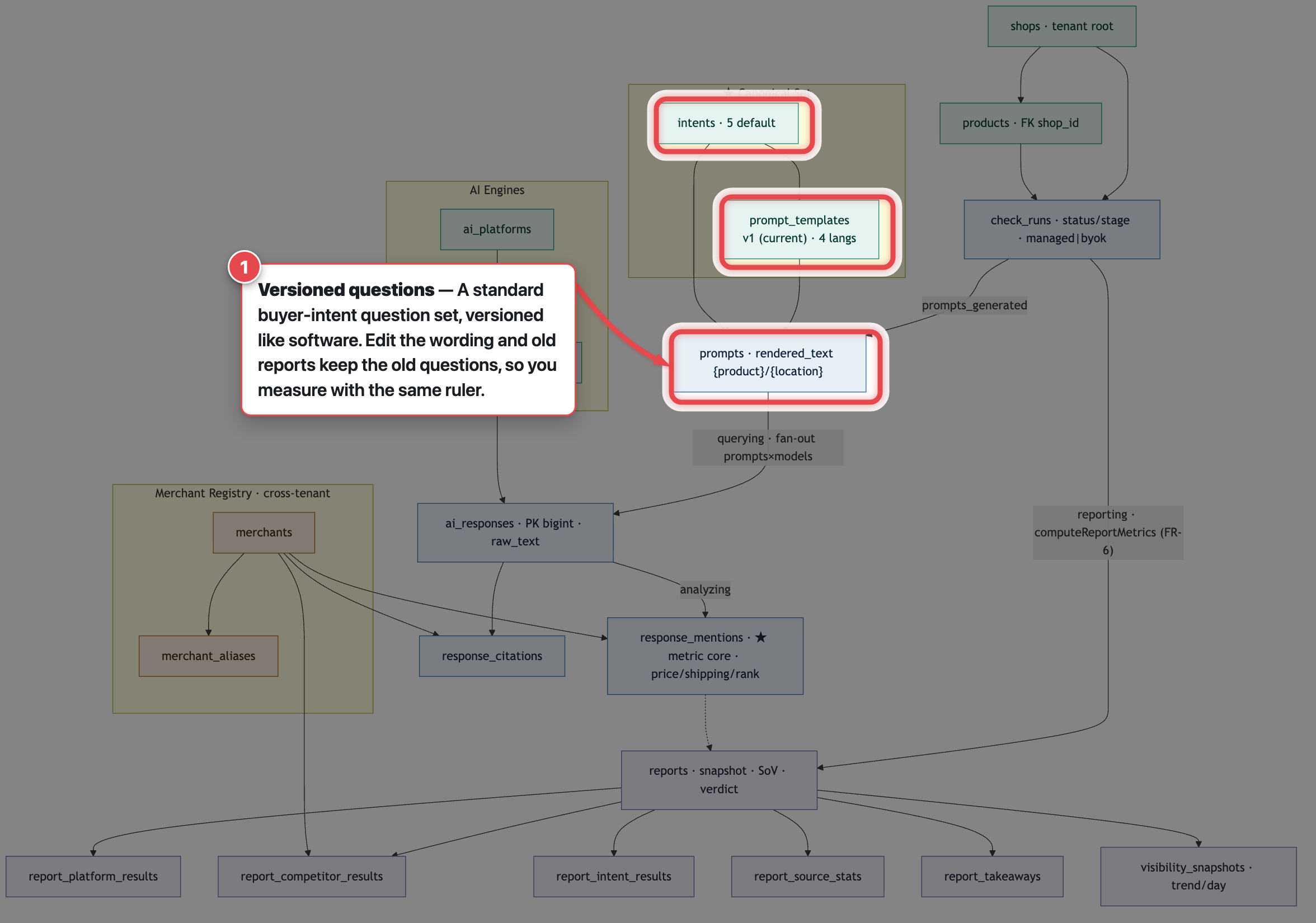
Two product decisions earn their keep here.
First, asking for the right name is a real problem. Feed the raw catalog title ("5 PDRN Collagen Intense Vitalizing Serum, Refurbished...", stuffed with SEO tails) and no shopper phrases it that way, so the AI matches poorly. Trim too hard, though, and it gets worse: cut "5 PDRN Collagen Intense Vitalizing Serum" down to "PDRN Collagen Serum" and the AI returns a best match of Medicube instead of COSRX, so the whole report has the wrong brand from the start. So the engine anchors the brand, keeps the identifying parts, and drops only the certain noise.
Second, the question set is versioned, like software. When the team edits the wording, that is a new version; old reports keep their old questions and are never rewritten. So when Linh compares this month to last month, she is measuring with the same ruler, not one whose marks moved.
Why the AI visibility engine asks four models
On the left of the diagram is the AI Engines cluster: ai_platforms (four chatbots, ChatGPT, Gemini, Google AI Mode, and Claude) and ai_models (the specific model for each, tagged api or scrape by how it is reached).
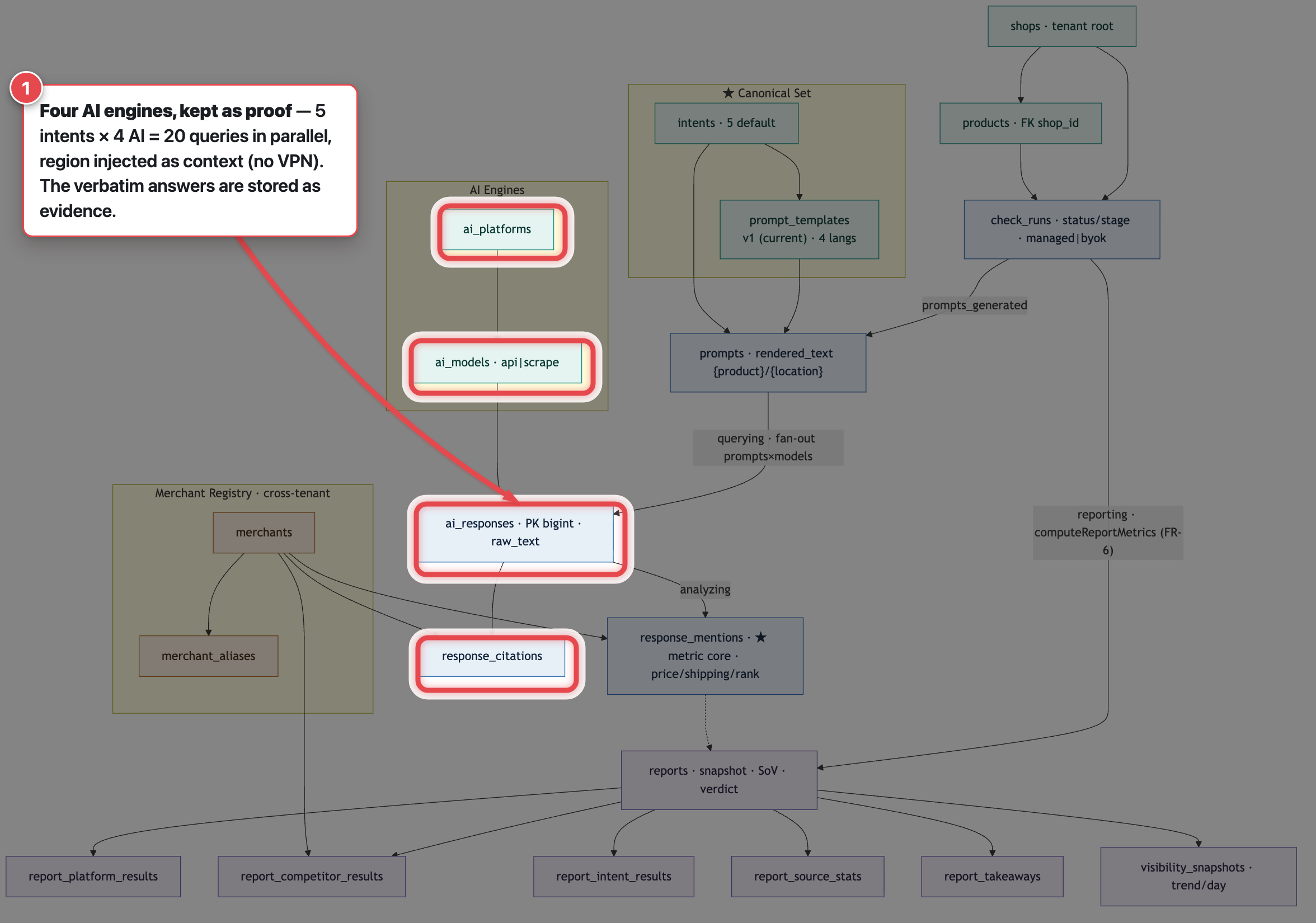
Why exactly these four names? Because these are where buyers actually ask when they decide: not only ChatGPT, but also Google's Gemini, Google AI Mode (the AI answer right on the Google results page, where many "where to buy" questions land), and Claude. Measuring one model skews the picture: each model answers differently and cites different sources, so one saying you are "invisible" does not mean the next one agrees. Reading all four gives a representative view. The set tracks the real AI-shopping market, which is also why the list once held "Google AI Overview" and later swapped in Claude to match how buyers now search. (On the technical side, three have APIs to call directly, while Google AI Mode may need reading from the results page, exactly the api | scrape label on the diagram. The list is not fixed either: as the market shifts, the engine set shifts with it.)
The query step then fans out: each question goes to each model. Five intents times four chatbots is twenty queries per check, running in parallel. Regional measurement happens by injecting context (location, language, currency) into the question, not by using a VPN. Every answer is stored in ai_responses with the verbatim text kept (raw_text), which is what later lets the report show its evidence.
Turning AI answers into numbers
This is the starred box in the diagram and the most important link: response_mentions, where the AI's words become measurable numbers.
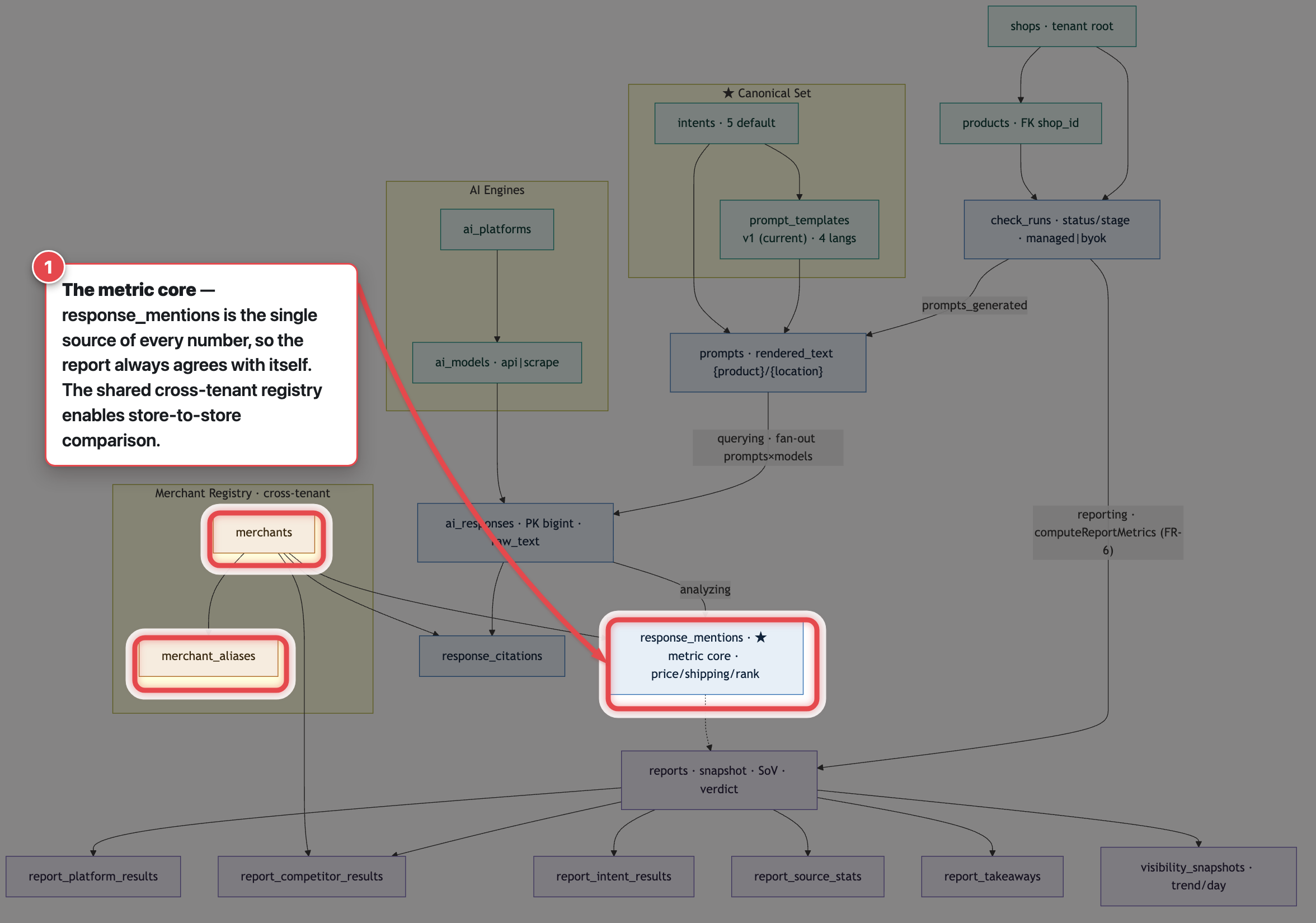
In the analysis step, each verbatim answer is parsed into a structured list of retailers: one row per store mentioned, with its position, price, and shipping, plus a flag for is this the merchant's own store. Every number on the report, coverage across the four chatbots, share of AI voice, rank, visibility percentage, comes only from this layer. That is why the numbers always agree with each other: they are computed once, from one source. (For the metrics themselves, see how to measure AI visibility.)
Next to it, the diagram has a separate cluster: Merchant Registry, cross-tenant (merchants plus merchant_aliases). This is a shared retailer directory that belongs to no single shop. It lets the engine recognize "Noon", "Amazon.ae", or a rival store even when the AI names it with a different spelling or domain. Because it is cross-tenant, it is the base for something a lone rank tracker does not have: cross-store comparison over time.
A frozen report you can trust
The final reporting step computes every metric once and writes it to reports, a frozen report (captured once, then never changed) carrying a four-tier verdict (Not visible to Highly visible), share of voice, and a total score.
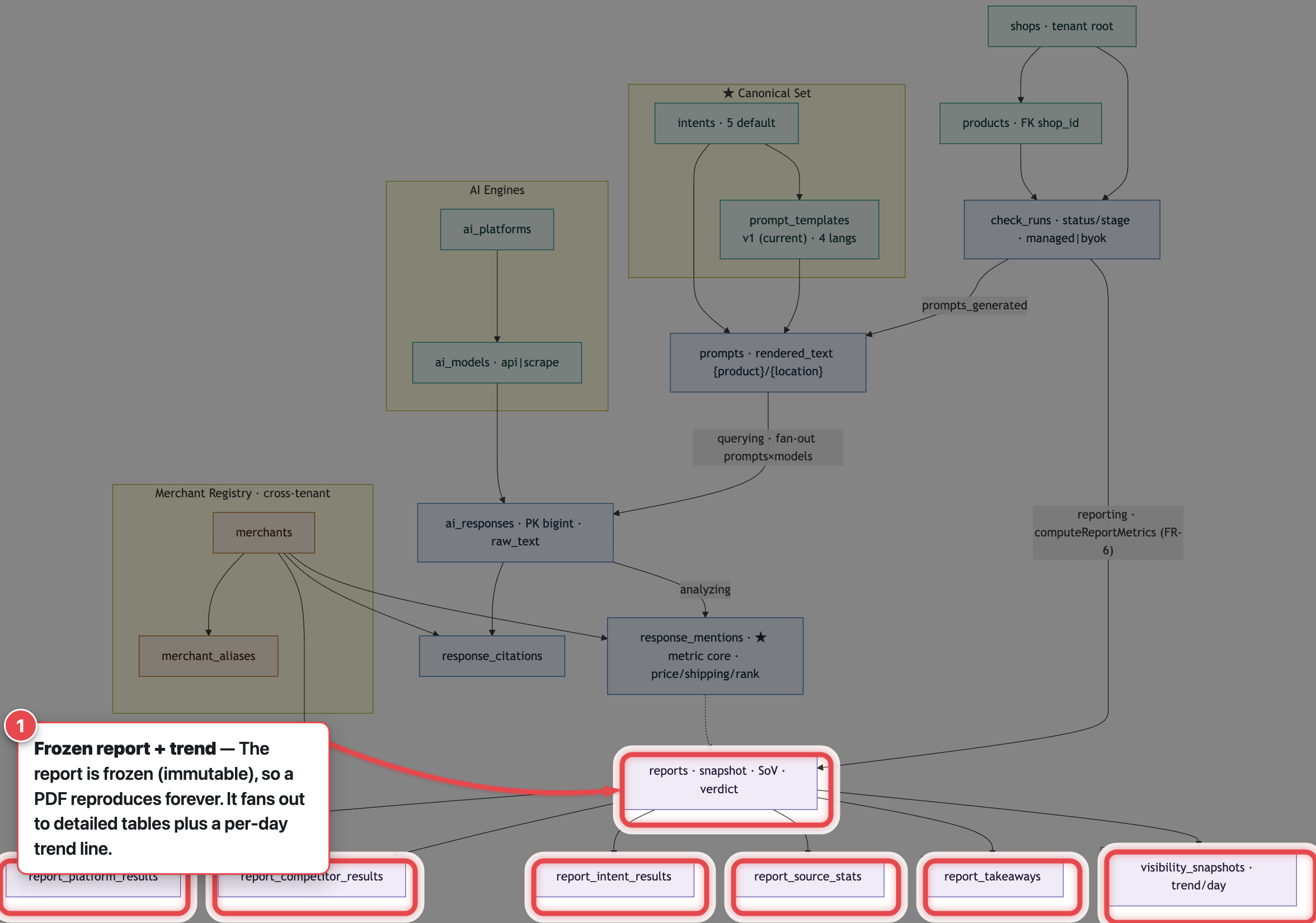
Why freeze it? Because AI answers change daily. A report Linh has already read, and exported to PDF for her boss, has to open the same way later, not recompute against new answers. From reports, the data fans out to the child tables at the bottom of the diagram:
report_platform_results: whether each chatbot mentioned the store, and at what position.report_competitor_results: the Market Position table (rivals, price, shipping, with your store pinned to the top).report_intent_results: how each buyer intent went.report_source_stats: which domains the AI cites most (raw material for later optimization).report_takeaways: a few AI-written notes.visibility_snapshots: one point per report on a timeline, so a re-check after fixes shows a clear before-and-after.
The report is not a passing glance. It is a fixed asset, backed by evidence, sitting on a timeline.
Why this is not a ChatGPT wrapper
This is the question worth answering head on. Put the two side by side: the same job of "seeing whether AI recommends your store", done two very different ways.
| Aspect | A ChatGPT wrapper | Mention Network |
|---|---|---|
| Queries | ✕ 1 question, 1 AI | ✓ 20 queries, 5 intents × 4 AI |
| Product name | ✕ asks whatever you type | ✓ fixes it so AI keeps the right brand |
| The answer | ✕ shown once, then gone | ✓ stored verbatim in a frozen report |
| Over time | ✕ a single look | ✓ tracked, before-and-after fixes |
| AI account | ✕ the app's account only | ✓ your own (BYOK) plus shared data to compare |
The point: a wrapper only forwards the question. Here, every step, fixing the name, asking many models, turning words into numbers, storing proof, tracking over time, is a decision that makes the number trustworthy. That is the difference between a button that calls ChatGPT and a measurement tool.
What the design says about the product
Step back and three things stand out, and all three are why this is an engine rather than a shell.
One, data flows one way through three layers. Raw answers, then numbers (response_mentions), then a frozen report. So the report stays fast and reproducible no matter how large the raw data grows.
Two, every number traces back to evidence. A line like "14% share of AI voice" is not a decorative figure; it traces to the exact answers that produced it. A number without proof is just a number; with proof, it becomes something you act on. This matters because shoppers still verify: the IAB found that in AI shopping sessions, nearly 80% of people still visited a retailer or marketplace to confirm a purchase decision (Digiday, 2025).
Three, the engine is open at the input and cumulative at the output. You can run it on your own AI account (BYOK) and still get the same report, and each run thickens the shared retailer directory for cross-store comparison. A rank counter only reports rank; this engine has a view of how AI picks a store, keeps the evidence for that view, and builds data over time. For where this sits in the wider practice, see our complete guide to GEO.
An honest limit, so we do not overstate it: the engine today does two jobs, measure and diagnose. The next two steps, prescribing fixes and applying them inside the store, are still on the roadmap.
Frequently asked questions
What is an AI Visibility Check?
An AI Visibility Check measures whether AI models name your store when a shopper asks a buying question like "where to buy [product] in [location]". It runs five buyer intents across four AI models (ChatGPT, Gemini, Google AI Mode, Claude), then reports your verdict, rank, competitors, and the raw AI answers as evidence.
Is an AI Visibility Check just a ChatGPT wrapper?
No. A wrapper forwards one question to one model and shows the reply. An AI Visibility Check asks twenty queries across four models, fixes the product name so the AI keeps the right brand, turns each answer into numbers, stores the raw text as proof, and freezes a report you can compare over time.
What is BYOK, and how does it differ from the managed lane?
With BYOK (bring your own key) you run the questions with your own AI keys and send only the results back for analysis, instead of letting Mention Network run them on its account (the managed lane). Your key never leaves your machine, and you pay the AI provider directly. To match a managed run you need access to all four engines (API keys or SDKs for ChatGPT, Gemini, and Claude, plus a page-reading route for Google AI Mode); miss one and that engine's slot is skipped.
Does Mention Network use a VPN to measure by region?
No. It measures by region by injecting the location, language, and currency into the question sent to the AI, rather than faking an IP address. Each check is one product, one location, one language.
Try an AI Visibility Check
If you want to see this pipeline run, there are two paths: run a free check on your top products and let Mention Network measure for you, or, if you would rather keep your AI account on your own machine, run it with your own keys through AI Visibility Studio.
Feature status as of 2026-07-24: the AI Visibility Check (Phase 1) has shipped; the BYOK route over MCP exists, while the native BYOK runner in the app, per-tenant API keys, and credit enforcement on the managed lane are on the roadmap. The schema-flow diagram is from internal design docs. The COSRX and Dubai example is illustrative, not a real customer.