
Shopify Structured Data: How AI Reads Your Store (and How to Fix It)
AI doesn't read your storefront, it reads your structured data. Here's exactly what ChatGPT and Gemini see of your Shopify store, at the store and product level, and how to make every field machine-clean so AI recommends you.

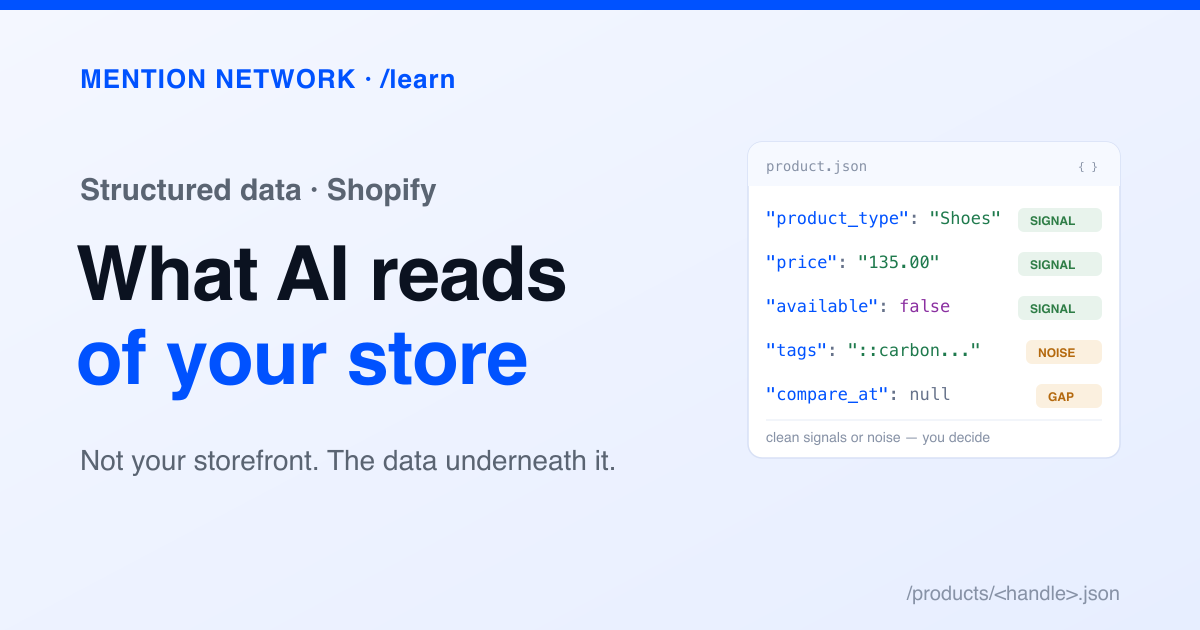
Here's the thing most store owners miss: AI doesn't read the storefront you designed. When a shopper asks ChatGPT or Gemini for a recommendation, the model isn't looking at your hero banner, your fonts, or your carefully art-directed product photos. It reads the machine version of your store, the structured data underneath. That version is either clear and complete, or it's a mess, and you probably haven't looked at it.
This guide shows you exactly what a machine sees of your Shopify store, at two levels, then how to make each field clean so AI can describe and recommend you accurately. We pulled the Shopify product data from a live store's public endpoint and the store-level model from the Storeleads API on July 8, 2026.
What you'll learn:
- Two layers AI reads: your store profile and your product data
- Layer 1: your store-level profile
- Layer 2: your product data (the part you can see right now)
- Shopify deep customization: making every field machine-clean
- A 6-point structured-data audit for your store
- Why this is the foundation, not the finish line
- Frequently asked questions
Two layers AI reads: your store profile and your product data
A machine builds its understanding of your store from two structured layers. Get both right and AI has an accurate, complete picture. Leave gaps and it fills them with guesses, or skips you.
Layer 1: your store-level profile
Aggregators and the crawlers that feed AI assemble a structured profile of your whole store from public signals. The Storeleads data model is a good map of what that profile contains, because it's exactly the set of fields a machine extracts about a store. Here are the ones that shape how AI understands and positions you.
The point isn't gaming an aggregator. Every one of these fields is assembled from structured signals you control. A missing returns page, a currency that doesn't resolve, a vague store description: each one is a blank in the profile AI uses to decide whether and how to recommend you.
Layer 2: your product data (the part you can see right now)
This is the layer store owners never look at, and it's public. Every Shopify store exposes its catalog as JSON. Open your store and add /products.json to the URL, or /products/your-product-handle.json for a single product. That's the raw product data any machine, including AI shopping agents, can read.
Here's a real, trimmed example from a live Shopify store (Allbirds), so you can see the actual shape:
{
  "title": "Men's Cruiser Terralux - Anthracite (Dark Gum Sole)",
  "handle": "mens-cruiser-terralux-anthracite",
  "vendor": "Allbirds",
  "product_type": "Shoes",
  "tags": [
    "allbirds::carbon-score => undefined",
    "allbirds::cfId => color-812bf8a9fcbc030cc9bb008dc85dffeb",
    "allbirds::complete => true"
  ],
  "options": [
    { "name": "Size", "values": ["8", "8.5", "9", "..."] }
  ],
  "variants": [
    {
      "title": "8",
      "sku": "A12400M080",
      "price": "135.00",
      "compare_at_price": null,
      "available": false,
      "grams": 877,
      "requires_shipping": true,
      "taxable": true
    }
  ],
  "images": [
    { "src": "https://cdn.shopify.com/.../Cruiser-Terralux.png", "width": 4000, "height": 4000 }
  ]
}
Now read it the way a machine does. Each field, what AI takes from it, and whether it's a clean signal or wasted:
allbirds::carbon-score => undefined. To a machine those carry no meaning. Useful tags are descriptive hooks a shopper would use: waterproof vegan running. More real hooks means more ways AI can match you.Product with an Offer and a rating" in a way a search engine trusts. That's what you add with Schema.org JSON-LD on the page, on top of clean fields like these.Shopify deep customization: making every field machine-clean
Now the part you actually do. Shopify gives you real control over structured data if you know where to look.
1. Add Product schema markup (JSON-LD)
The raw product JSON is data; Schema.org schema markup (as JSON-LD) is data with meaning a search engine and AI explicitly trust, and it's what earns rich results in search. Add a Product schema to your product template so machines get an unambiguous statement. A minimal shape (values illustrative):
{
  "@context": "https://schema.org",
  "@type": "Product",
  "name": "Men's Cruiser Terralux",
  "brand": { "@type": "Brand", "name": "Allbirds" },
  "sku": "A12400M080",
  "image": "https://cdn.shopify.com/.../cruiser.png",
  "offers": {
    "@type": "Offer",
    "price": "135.00",
    "priceCurrency": "USD",
    "availability": "https://schema.org/InStock"
  },
  "aggregateRating": {
    "@type": "AggregateRating",
    "ratingValue": "4.6",
    "reviewCount": "812"
  }
}
Many Shopify themes include Product schema, but plenty ship it incomplete or broken. Run a product page through Google's Rich Results Test and fix what's missing. Our guide to Shopify schema markup covers the full set of types worth adding and how to test them.
2. Fill metafields and use the standard product taxonomy
Metafields are where structured attributes live: material, gender, dimensions, GTIN, care instructions. A machine reads a filled material: "merino wool" metafield; it can't read that fact out of a paragraph. Map the ones that matter for your category and expose them in your theme and schema.
See Shopify metafields for structured product data for the full walkthrough. Then use Shopify's Standard Product Taxonomy. Assigning a product to Shopify's standard category (not just a free-text product_type) gives AI a consistent, machine-known classification, so you land in the right shopper query instead of a category only you understand.
3. Clean your tags and product_type
Following the Allbirds example: audit your tags. Drop internal system tags that leak into the public JSON, and add descriptive ones a shopper would use. Give every product a real product_type. These are cheap fixes with direct machine payoff.
4. Structure your product descriptions
The body_html field is often one wall of text. Machines parse structure. Use real headings, bullet lists for features, and a specs table. A description with a clear "Materials", "Fit", and "Care" structure gives AI clean, extractable facts instead of prose it has to guess through.
5. Open your catalog to AI agents
Two moves here. First, confirm your robots.txt allows the AI crawlers (GPTBot, OAI-SearchBot, and others) so they can read the structured data you just cleaned up. Second, Shopify's Catalog and Storefront MCP servers expose your structured catalog directly to AI shopping agents. If AI-driven discovery matters to you, that's the pipe your clean data flows through. A third pipe is your Google Merchant Center feed, which now feeds Google's AI and agentic shopping. We cover the connectors in 20 best MCP servers for Shopify and WooCommerce and the shopper side in how to optimize your store for ChatGPT Shopping. For how the agents actually choose, see how AI shopping assistants pick products.
A 6-point structured-data audit for your store
Run this on your own store today:
- Read your raw JSON. Open
yourstore.com/products/a-product.json. Is the product_type set? Are the tags meaningful or internal junk? Is availability correct? - Test your schema. Run a product page through the Rich Results Test. Does
ProductwithOfferand price validate cleanly? - Check your store profile. Is your store description clear, your currency correct, your returns and shipping pages present?
- Fill key metafields for your category, and assign the standard product taxonomy.
- Restructure one product description into headings, a feature list, and a specs table.
- Confirm AI crawler access in robots.txt.
Why this is the foundation, not the finish line
Structured data is what makes your store legible to AI. Get it clean and you've given ChatGPT, Gemini, and Google AI an accurate, complete picture to recommend from. Leave it messy and no amount of design fixes the machine's blurry view of you.
But clean structure is the input, not the outcome. The question that actually pays is whether AI recommends your store once it can read you clearly, and that's something you measure, not assume.
Is AI recommending your store? Check free.
Frequently asked questions
What is structured data for a Shopify store?
Structured data is your store's information in a machine-readable format: the product JSON Shopify exposes, Schema.org markup, metafields, and the catalog fields aggregators and AI assistants read. It's the version of your store a machine sees, separate from the design humans see.
Does structured data affect whether AI recommends my store?
Yes. AI assistants and the crawlers that feed them build their picture of your store from structured signals, not your visual design. If your product type, tags, price, availability, and schema are clean and complete, AI can describe and recommend you accurately. If they're messy or missing, its picture of you is too.
How do I see the structured data my Shopify store already exposes?
Open your store URL and add /products.json, or /products/your-handle.json for one product. That returns the raw product data any machine can read. For your Schema.org markup, run a product page through Google's Rich Results Test.
What's the difference between the Shopify product JSON and schema markup?
The product JSON is the raw catalog data Shopify exposes at the .json endpoints. Schema.org markup (JSON-LD) is explicit structured data you add to the page to tell search engines and AI what the page is: a Product, with an Offer, a price, and a rating. You want both clean.